Multi Server System Plugin
Multi Server System plugin allows you to stream videos from the remote servers.
User or admin uploaded videos are converted and then moved via FTP to one of streaming/storage servers specified in Servers section on your Admin Panel (if you have more than one server, the server selection is based on the last used date). The player will stream the videos from the remote servers (allowing to have a lot of videos distributed across more than one server, video streaming is faster and the hard drive space increases).
How to install
The ways of installing plugins into your website is the same as other plugins. Just download each plugin zip file, unzip them and copy folders and files in root(mostly upload) folder to your server directly. Overwrite files if needed.
Once you install plugins(just copy!!!), Reload your website to have an effect.
1) Download the plugin zip file (filename is like: AVS - Multi-Server Plugin 3.7 (for v8).zip) from your PC.
2) Unzip the zip file to your PC, then upload folder and 2 text files are extracted.
3) Explore upload folder and select all folders, and paste them into your existing server root directory (Overwrite them if needed).
How to use the multi server system plugin
On the secondary storage server
On a secondary storage server, you need to create the following directory structure:
/media
/media/videos
/media/videos/h264
/media/videos/h264 directory must have CHMOD 777 (write permissions).
On the primary server
1) Login to your siteadmin panel and click on Settings / General / System Settings menu, and enable Multi Server System. 2) Go to Servers / Add Server page from the sidebar menu, and follow the instructions.
A subdomain (e.g. videos.mywebsite.com) or a new domain pointed to the storage server and a FTP account are required.
URL http://videos.mywebsite.com
Video URL http://videos.mywebsite.com/media/videos
FTP IP / Hostname xxx.xxx.xxx.xxx (IP Address) or ftp.mywebsite.com
FTP Username ftpuser
FTP Password ftppassword
FTP Path to Videos Directory /public_html/media/videos
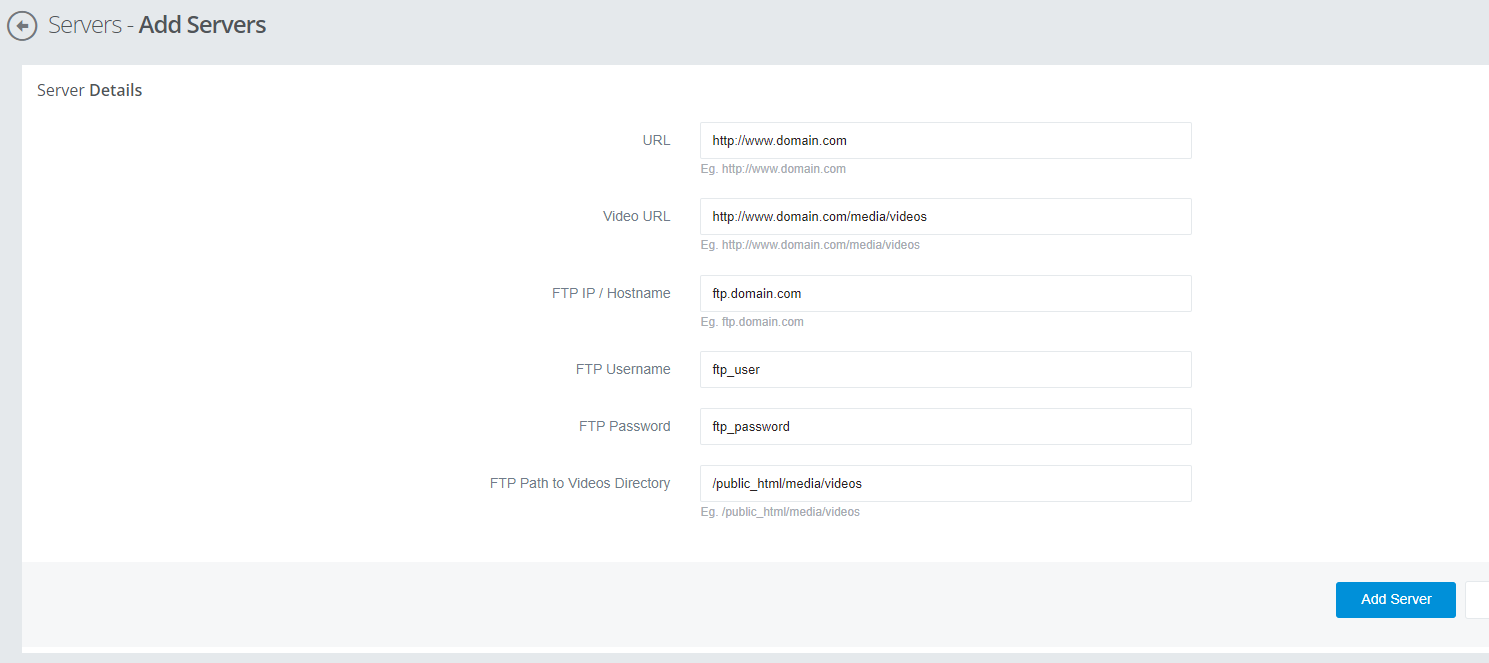
3) Click on Add Server button.