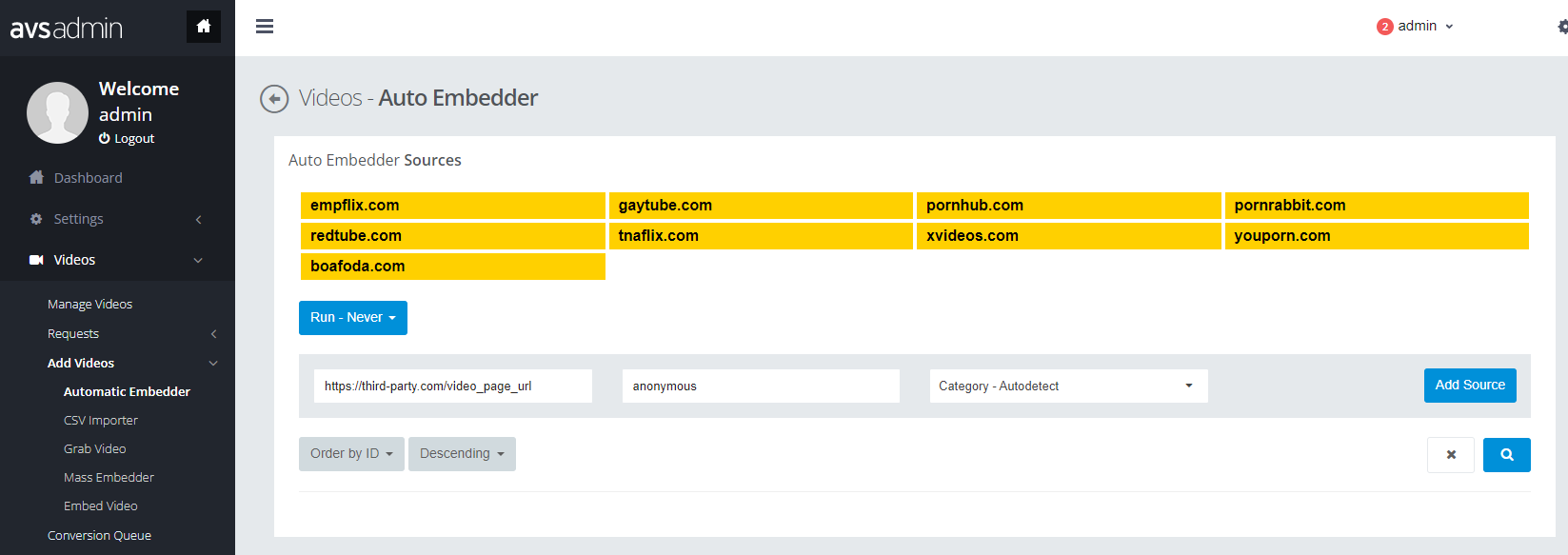
Automatic Embbeder Plugins
CSV Importer plugin allows you to import video links from Third Party Video Sites automatically. Once you add source page, the website fetches videos periodically.
Supported Third Party Websites
- xvideos
- pornhub
- redtube
- empflix
- pornrabbit
- tnaflix
- youporn
- boafoda
How to install
The ways of installing plugins into your website is the same as other plugins. Just download each plugin zip file, unzip them and copy folders and files in root(mostly upload) folder to your server directly. Overwrite files if needed.
Once you install plugins(just copy!!!), Reload your website to have an effect.
1) Download the plugin zip file (filename is like: AVS - Automatic Embedder 1.8 (for v8).zip) from your PC.
2) Unzip the zip file to your PC, then upload folder and Installation.txt file are extracted.
3) Explore upload folder and select all folders and files, and paste them into your existing server root directory(overwrite if needed).
How to use the automatic embbeder plugin
Note that these operations can be handled with site administrator privilege.
First, visit siteadmin page of your website(for example: http://www.yourdomain.com/your-subdirectory/siteadmin), and login as a siteadmin.
1) Click on Videos / Add Videos / Automatic Embedder menu on the left sidebar, then Videos - Auto Embedder page is displayed.
2) Fill in Page URL in which videos are listed, and Username (default is anonymous).
3) Select Category option as Autodetect or one of categories if you need to set a category manually.
4) Click on Add Source to add this page.
Set Periodicity which is the interval of video fetch. This includes:
- Run-Never
- Every Hour
- Every 3 Hours
- Every 6 Hours
- Every 12 Hours
- Every Day
- Every Week